ANDROID FOR FRESHERS
Android Program Audio Player Activity
Java Code(AudioAct)
import android.app.Activity; import android.content.Intent; import android.os.Bundle; import android.view.View; public class AudioAct extends Activity { @Override protected void onCreate(Bundle savedInstanceState) { super.onCreate(savedInstanceState); setContentView(R.layout.activity_audio); } public void startMe(View v) { Intent i = new Intent(this,Myservice.class); startService(i); } public void stopMe(View v) { Intent i = new Intent(this,Myservice.class); stopService(i); } }Java Code (Myservice.class)
import android.app.Service; import android.content.Intent; import android.media.MediaPlayer; import android.os.IBinder; import android.support.annotation.Nullable; public class Myservice extends Service { MediaPlayer mp; @Nullable @Override public IBinder onBind(Intent intent) { return null; } @Override public void onCreate() { super.onCreate(); mp = MediaPlayer.create(this,R.raw.rock); } @Override public void onStart(Intent intent, int startId) { super.onStart(intent, startId); mp.start(); } @Override public void onDestroy() { super.onDestroy(); mp.stop(); } }Layout XML Code(activity_audio)
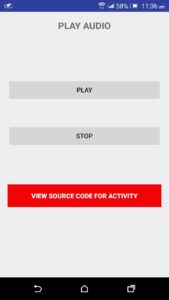
<?xml version="1.0" encoding="utf-8"?> <LinearLayout xmlns:android="http://schemas.android.com/apk/res/android" xmlns:tools="http://schemas.android.com/tools" android:layout_width="match_parent" android:layout_height="match_parent" android:orientation="vertical" android:paddingBottom="@dimen/activity_vertical_margin" android:paddingLeft="@dimen/activity_horizontal_margin" android:paddingRight="@dimen/activity_horizontal_margin" android:paddingTop="@dimen/activity_vertical_margin" tools:context="com.andro.tech.androidproject.AudioAct"> <TextView android:layout_width="wrap_content" android:layout_height="wrap_content" android:textSize="@dimen/textsize" android:layout_gravity="center" android:textStyle="bold" android:text="@string/Audiotext" android:layout_marginBottom="100dp" /> <Button android:layout_width="match_parent" android:layout_height="wrap_content" android:text="PLAY" android:onClick="startMe" android:layout_marginBottom="50dp"/> <Button android:layout_width="match_parent" android:layout_height="wrap_content" android:text="STOP" android:onClick="stopMe" android:layout_marginBottom="80dp"/> <Button android:layout_width="match_parent" android:layout_height="wrap_content" android:text="@string/sourcecode" android:background="@color/bgcolor" android:textStyle="bold" android:textColor="@color/text" android:onClick="view1"/> </LinearLayout> Output
Android multimedia example source code download
Download Audio Player Source Code For More Android Programs -Click Here Follow Us – Never Miss Update Fb/Page, Twitter, Google+, Instagram, Pinterest Related Search Android Audio player activity snippet source code download, android audio snippet code download, android multimedia activity snippet source code download, android multimedia audio insert snippet code download, android multimedia example download, android multimedia snippets java code download, android multimedia example source code downloadWas this guide helpful?