How to fix Google Calander Spam Notification Your e-mail address is the winner of our annual competition! Your prize money is $1083. Follow the instructions on the website to get it
Google Spam Calendar Invites: Recently times, spammers firing event notifications from Google calendar with title “SPAM? Notification: Notification №6538 CONGRATULATIONS!” which is google calendar event set up to notify us every day for the next 7 days even more pathetic and irritating is that this event repeats for 7 times in a day even we delete the event from the calendar
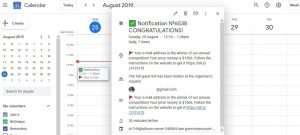
How to fix Google Calander Spammer Notification Your e-mail address is the winner of our annual competition
Step To Remove Spam Notifications
1) Open Google Calander in Desktop
2) Click on “Setting”, available on the right corner
3) A new window “setting” page will be seen as like below
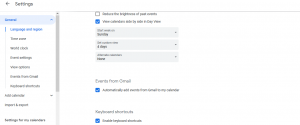
4) In Event From Gmail Section, Uncheck the box which highlighted “Automatically add events from Gmail to my calendar”
5) By doing uncheck, Gmail won’t able to add events automatically to our google calendar
6) Uncheck and Save setting
By following these simple steps, you can get rid off from this irritating Google Spam Calendar Invites Notifications Alerts
The Best way to keep our Google account is safe is to go with “Security Checkup” frequently to avoid these spam setting
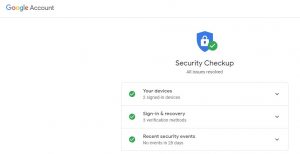
If you find anything suspicious with your google account, just follow the instructions from Google to remove all unwanted Sign-in, third party access, and security events
I too got this irrigating mgs. Tq I Fixed now