How to fix Earnings at risk You need to fix some ads.txt file issues to avoid severe impact to your revenue
Google Adsense ads.txt Error: With Recent google update, warning alert popping out in google Adsense account as” Earnings at risk – You need to fix some ads.txt file issues to avoid severe impact to your revenue” reason to create more control over on ads in our site which prevent counterfeit inventory from advertisers
How to fix google Adsense ads.txt file error
- Download ads.txt file from your Google Adsense
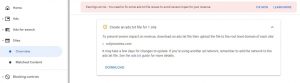
- In the downloaded file, you will find one line text code which looks like “google.com, pub-0000000000000000, DIRECT, f08c47fec0942fa0”
- Upload the downloaded file to the root level domain of your site (https://example.com/ads.txt).
For WordPress Websites
- Download ads.txt file from your Google Adsense
- Download “Ads.txt Manager” Plugin by 10up in WordPress plugins
- Install the plugin and activate it
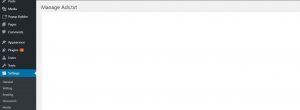
- In WordPress dashboard, search for settings and select “ads.txt”
- A new window will be seen as like below
- Copy and paste your Google AdSense code which got in the downloaded file
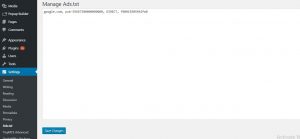
- After pasting your google ads txt code, click on “Save Changes“
- By this process, your error message will be gone permanently
With the simple plugin install and copy-past of google AdSense ads.text code, the error in the Google Adsense account will go off, wait for at least 24 hrs to reflect changes in Google Adsense account
By Fdaytalk– Let’s Make Easy